Your myPay Menu Breakdown
Leave and Earnings Statement
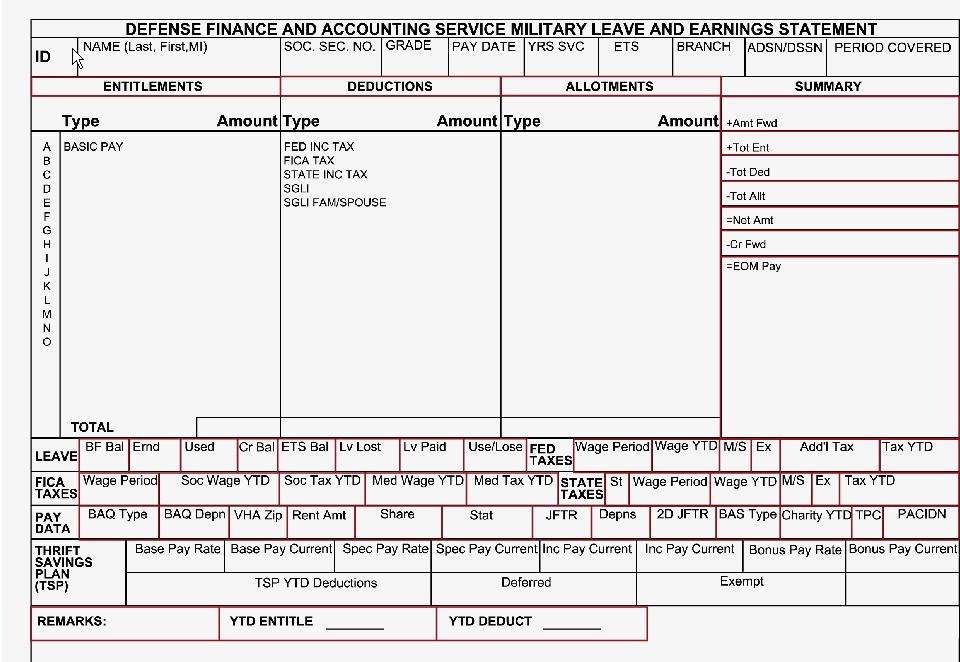
Please referred to 108 Solution’s article on how to read a Military Leave and Earnings Statement (LES)
Savings Deposit Program (SDP)
This is provided to help members of the uniformed services serving in designated combat zones the opportunity to build their financial savings. They can start a SDP account once they have been deployed for a minimum of 30 consecutive days or at least one day in each of three consecutive months, and must be receiving Hostile Fire Pay. Any military finance office can help you establish an account and assist you in setting up the deposit method most convenient for you.
A total of $10,000 may be deposited during each deployment and will earn 10% interest annually. You cannot close your account until you have left the combat zone, although your money will continue to draw interest for 90 days once you’ve returned home or to your permanent duty station. Payments may be made in cash, by check or through allotments. Allotments may be increased once started or decreased as your finances change. Your allotment will stop once you depart from the combat zone.
SDP Statement/ Withdrawal Request
Withdrawals may only be made upon termination of eligibility of program. Members must submit a withdrawal request online using myPay. Members may close their SDP accounts only after departing the combat zone. Interest will continue to accrue on the account up to 90 days after departure from the combat zone. Should the 90 day period end on any day other than the last day of the month, interest will accrue through the last day of the preceding month. If the 90 day period ends on the last day of the month, interest accrues for that month. Members in a combat zone may withdraw accrued interest over the $10,000 principal quarterly. Withdrawals of funds on deposit may be made in an emergency only when the health or welfare of a member or dependents would be jeopardized if the withdrawal were not granted. Emergency withdrawals must be authorized by the members' commanding officer.
Pay Changes
Allotments
Your military allotment is when the military automatically takes money out of your military paycheck and sends it to another institution. This is also known as a payroll deduction. This allows you to pay bills, insurance premiums, mortgages, etc. directly out of your pay. Allotments take time to show up in myPay. You will not see a request until you receive your next account statement. Once you have entered an allotment into myPay, give it time to post. Entering the allotment more than once could cause the system to set up two allotments instead of one, causing pay inconsistencies.

Turn on/off Hard Copy of LES
This section allows you to customize how you would like to receive your Leave and Earnings Statement (LES). This gives you the option of:
Direct Deposit
Net Pay EFT
The most efficient, timely and secure way to receive your pay is through Net Pay EFT. It eliminates the possibility of a lost or stolen check, reduce the opportunity for identity theft, and receive your payment in a more timely and efficient manner. There are two ways to update your direct deposit information. You will need your bank routing number, account number, and type of account (checking or savings) readily available.
Travel/ Miscellaneous Electronic Funds Transfer (EFT)
Electronic Fund Transfer (EFT) is a system of transferring money from one bank account directly to another. One of the most widely-used EFT programs is Direct Deposit, in which payroll is deposited straight into an employee's bank account, although EFT refers to any transfer of funds initiated through an electronic terminal, including credit card, ATM, Fedwire and point-of-sale (POS) transactions. It is used for both credit transfers, such as payroll payments, and for debit transfers, such as mortgage payments.
Taxes
A portion of your pay is withheld from each paycheck for federal and state income tax purposes based on your situation. Are you married? Do you have dependents? If so, how many? This information is reported to DFAS when you fill out an IRS W4 form and turn it into your finance office or when you use myPay to update your information online.
**You cannot use myPay to:
Federal Withholdings
Note: You cannot use myPay to:
Marital Status
Exemptions (refer to the number of allowances you wish to claim on the Federal W-4 form) This includes the following:
State Withholdings
Specific Amount: the total amount you want withheld from each paycheck
*Note: You may change or stop withholdings for your current state only; you may NOT use myPay to change your state, file the initial state withholdings form, or file exempt from state withholding. You may also:
Tax Statement (W-2)
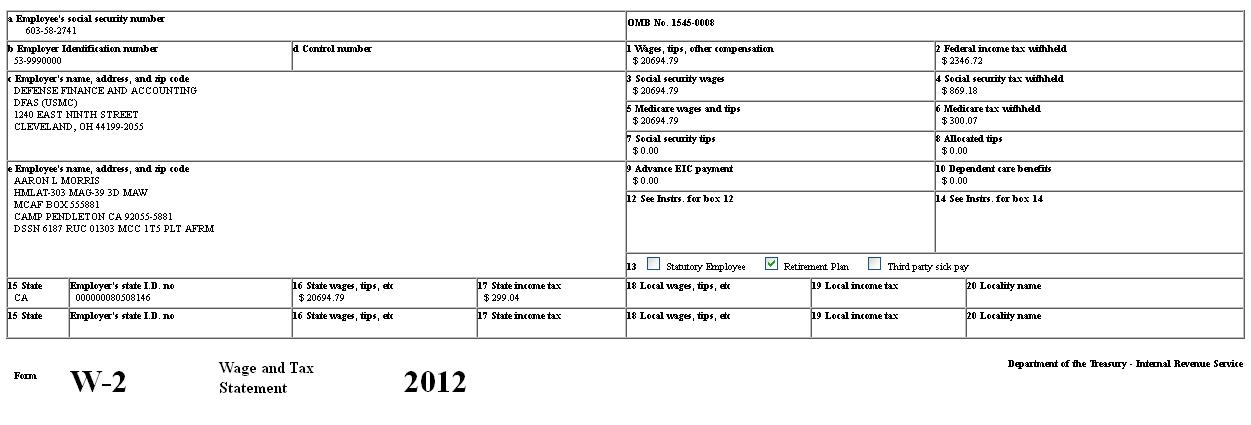
At the end of the year, DFAS provides you with the appropriate tax statements based on the type of income you have received. Most of the time, this is the W2 reporting your military compensation and pay. Special W2’s or other tax statements are also produced for certain income such as Savings Deposit Program interest or DITY move travel reimbursement.
Student Loan Repayment Program (SLRP) W-2
The Student Loan Repayment Program (SLRP) is a recruitment and retention tool used by the Department to attract and retain Civil Service and Foreign Service employees applying for or encumbering specific positions. The program assists employees with payments on student loan debt taken out by them to support courses of study already completed. Payments are made directly to an employee’s lender or loan servicing organizations. If you are considered under this program,
Travel/ Miscellaneous Tax Statement (W-2)
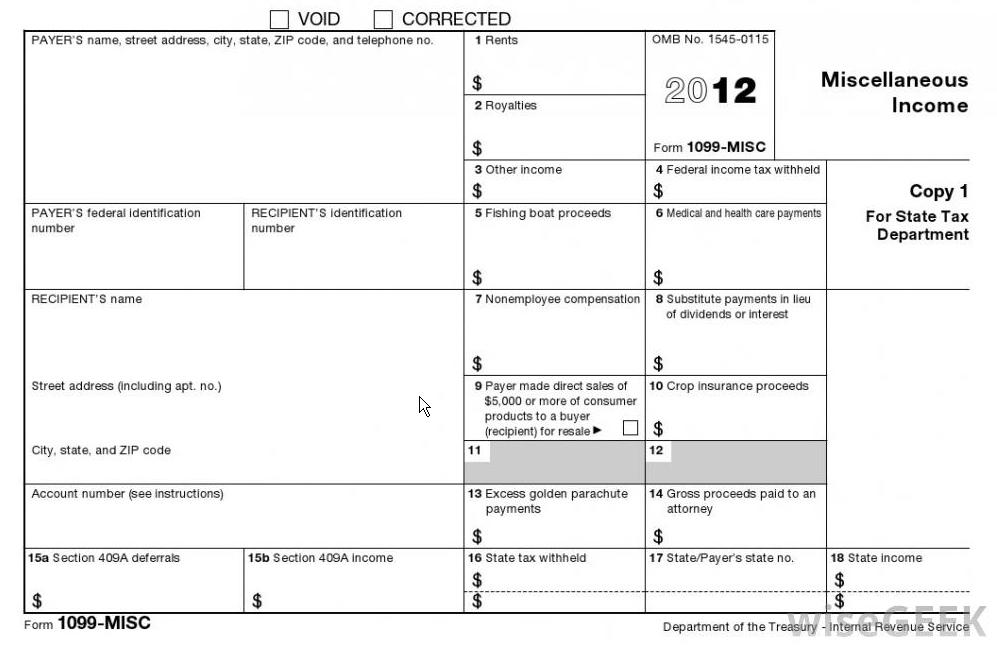
This is a type of tax form. It is used to report travel and miscellaneous income, such as income earned as a non-employee, as well as fees, commissions, rents, or royalties paid during the last tax year. Payments for prizes, awards, legal services, and other non-employee activities may be reported on this form as well.
Leave and Earnings Statement
Please referred to 108 Solution’s article on how to read a Military Leave and Earnings Statement (LES)
Savings Deposit Program (SDP)
This is provided to help members of the uniformed services serving in designated combat zones the opportunity to build their financial savings. They can start a SDP account once they have been deployed for a minimum of 30 consecutive days or at least one day in each of three consecutive months, and must be receiving Hostile Fire Pay. Any military finance office can help you establish an account and assist you in setting up the deposit method most convenient for you.
A total of $10,000 may be deposited during each deployment and will earn 10% interest annually. You cannot close your account until you have left the combat zone, although your money will continue to draw interest for 90 days once you’ve returned home or to your permanent duty station. Payments may be made in cash, by check or through allotments. Allotments may be increased once started or decreased as your finances change. Your allotment will stop once you depart from the combat zone.
SDP Statement/ Withdrawal Request
Withdrawals may only be made upon termination of eligibility of program. Members must submit a withdrawal request online using myPay. Members may close their SDP accounts only after departing the combat zone. Interest will continue to accrue on the account up to 90 days after departure from the combat zone. Should the 90 day period end on any day other than the last day of the month, interest will accrue through the last day of the preceding month. If the 90 day period ends on the last day of the month, interest accrues for that month. Members in a combat zone may withdraw accrued interest over the $10,000 principal quarterly. Withdrawals of funds on deposit may be made in an emergency only when the health or welfare of a member or dependents would be jeopardized if the withdrawal were not granted. Emergency withdrawals must be authorized by the members' commanding officer.
Pay Changes
Allotments
Your military allotment is when the military automatically takes money out of your military paycheck and sends it to another institution. This is also known as a payroll deduction. This allows you to pay bills, insurance premiums, mortgages, etc. directly out of your pay. Allotments take time to show up in myPay. You will not see a request until you receive your next account statement. Once you have entered an allotment into myPay, give it time to post. Entering the allotment more than once could cause the system to set up two allotments instead of one, causing pay inconsistencies.
Turn on/off Hard Copy of LES
This section allows you to customize how you would like to receive your Leave and Earnings Statement (LES). This gives you the option of:
- Stopping manual delivery of a hard copy LES OR
- Starting manual delivery of hard copy LES when electronic delivery is not convenient
Direct Deposit
Net Pay EFT
The most efficient, timely and secure way to receive your pay is through Net Pay EFT. It eliminates the possibility of a lost or stolen check, reduce the opportunity for identity theft, and receive your payment in a more timely and efficient manner. There are two ways to update your direct deposit information. You will need your bank routing number, account number, and type of account (checking or savings) readily available.
Travel/ Miscellaneous Electronic Funds Transfer (EFT)
Electronic Fund Transfer (EFT) is a system of transferring money from one bank account directly to another. One of the most widely-used EFT programs is Direct Deposit, in which payroll is deposited straight into an employee's bank account, although EFT refers to any transfer of funds initiated through an electronic terminal, including credit card, ATM, Fedwire and point-of-sale (POS) transactions. It is used for both credit transfers, such as payroll payments, and for debit transfers, such as mortgage payments.
Taxes
A portion of your pay is withheld from each paycheck for federal and state income tax purposes based on your situation. Are you married? Do you have dependents? If so, how many? This information is reported to DFAS when you fill out an IRS W4 form and turn it into your finance office or when you use myPay to update your information online.
- Federal Withholding
- State Withholding
- Tax Statement (W-2)
- Student Loan Repayment Program (SLRP) W-2
- Travel/ Miscellaneous Tax Statement (W-2)
- Turn on/off Hard Copy of W-2
- SDP Tax Statement 1099-INT
**You cannot use myPay to:
- File Advanced Earn Income Credit
- File Exempt from Federal Tax Withholdings
- Claim more than 10 Exemptions
Federal Withholdings
Note: You cannot use myPay to:
- File Advanced Earn Income Credit
- File Exempt from Federal Tax Withholdings
- Claim more than 10 Exemptions
Marital Status
- Single (widowed, divorced, or never married)
- Married
- Married but withholdings at the higher single rate
Exemptions (refer to the number of allowances you wish to claim on the Federal W-4 form) This includes the following:
- Yourself
- Your spouse (unless living separately)
- Your children or other legal dependents
State Withholdings
Specific Amount: the total amount you want withheld from each paycheck
*Note: You may change or stop withholdings for your current state only; you may NOT use myPay to change your state, file the initial state withholdings form, or file exempt from state withholding. You may also:
- Change your Filing Status & Exemptions or select a Specific Amount to withhold, change a previously elected Specific Amount, or Stop the elected Specific Amount
- Elect a Specific Amount which will disregard status and exemptions claimed. For example, if you are claiming S-1, but elect $50.00 specific, only $50.00 will be deducted
- Stop the elected Specific Amount which will start deductions based on exemptions and status. For example, if you have elected $50.00 per month specific and you are claiming S-1, this will STOP the $50.00 and Start the S-1.
Tax Statement (W-2)
At the end of the year, DFAS provides you with the appropriate tax statements based on the type of income you have received. Most of the time, this is the W2 reporting your military compensation and pay. Special W2’s or other tax statements are also produced for certain income such as Savings Deposit Program interest or DITY move travel reimbursement.
Student Loan Repayment Program (SLRP) W-2
The Student Loan Repayment Program (SLRP) is a recruitment and retention tool used by the Department to attract and retain Civil Service and Foreign Service employees applying for or encumbering specific positions. The program assists employees with payments on student loan debt taken out by them to support courses of study already completed. Payments are made directly to an employee’s lender or loan servicing organizations. If you are considered under this program,
Travel/ Miscellaneous Tax Statement (W-2)
This is a type of tax form. It is used to report travel and miscellaneous income, such as income earned as a non-employee, as well as fees, commissions, rents, or royalties paid during the last tax year. Payments for prizes, awards, legal services, and other non-employee activities may be reported on this form as well.
Turn on/off Hard Copy of W-2
This section allows you to customize how you would like to receive your tax statements. This gives you the option of:
- Stopping manual delivery of a hard copy W-2 OR
- Starting manual delivery of hard copy W-2 when electronic delivery is not convenient
SDP Tax Statement 1099-INT
This form provided by payers of interest income, such as banks and savings institutions, that summarizes your interest income for the tax year. Interest reported on Form 1099-INT includes interest paid on savings accounts, interest-bearing checking accounts, and US Savings bonds. This form is also used to report other tax items related to your interest income, such as early withdrawal penalties and federal tax withheld. All information provided on Form 1099-INT is reported to the Internal Revenue Service.
Thrift Savings Plan (TSP)
A defined contribution plan for United States civil service employees and retirees as well as for members of the uniformed services.
Travel Voucher Advice of Payment (AOP)
The Travel AOP option provides myPay users with the capability to view and print their processed TDY Travel Vouchers online.
Email Address
In this section you will find the opportunity to change/update your email address listed on your accounts.
Security Questions for Password Resets
This section is where you can change your Security Questions for protecting your account from fraud and other people getting your information.
Personal Settings Page
When you open this section, it gives you a list of information that you can customize. Listed below are the functions that you can change in this menu:
- Change password - for use on myPay web only
- Change PIN - for use on systems other than myPay Web
- Change Login ID
- Limited Access Account - Create/ Change/ Delete
- Turn On/Off Alert Setting(s)
Follow 108 Solutions Military Loans and Financing!
Maximize your Retirement Savings: Tax Advantages
https://www.tsp.gov/planningtools/strategies/taxAdvantages.shtml
Savings Deposit Program
http://militarypay.defense.gov/benefits/SDP.html
Allotments
http://www.dfas.mil/retiredmilitary/manage/allotments.html
DoD Savings Deposit Program
http://www.dfas.mil/militarymembers/payentitlements/sdp.html
Direct Deposit
http://www.dfas.mil/retiredmilitary/manage/direct-deposit.html
